Baldur's Gate: Enhanced Edition takes the 1998 RPG that set the bar for computer role-playing and rebuilds it for modern Windows machines. We installed version 2.5 from the direct GOG installer, ran it on a mid-range desktop, and spent several evenings working through the Sword Coast to see how this edition holds up. What follows is our hands-on breakdown: what the game does well, where the port shows its age, and whether the download is worth your time.
If you grew up with the original, the pitch is simple. You get the full base campaign, the Tales of the Sword Coast expansion, and the new content Beamdog added on top. If you've never touched a Dungeons & Dragons CRPG before, the learning curve is real but the payoff is enormous. Either way, this is a party-based tactical RPG with hundreds of hours of story, and it runs from a single installer.
Download Baldur's Gate: Enhanced Edition (v2.5) — 4.28 GB
Technical Specifications
| Version | 2.5 |
| File Size | 4.28 GB |
| Operating System | Windows |
| Category | Role-Playing Game (DRM-Free PC Games) |
| License | Free |
| Developer | GOG Unlocked |
What Makes This Edition Different
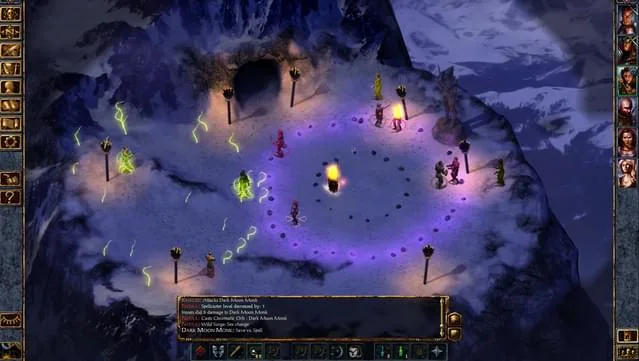
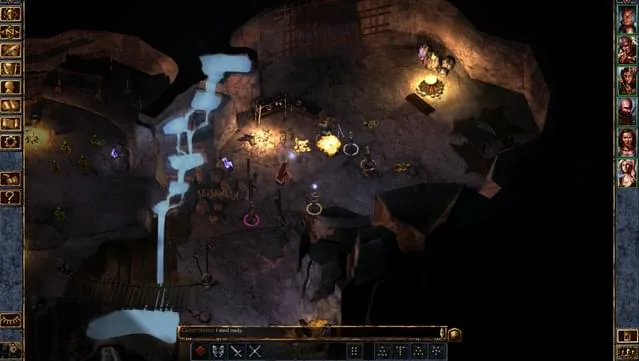
The Enhanced Edition isn't a coat of paint. The interface has been rebuilt for widescreen displays, so you no longer squint at a tiny 640x480 window. On our test monitor the UI scaled cleanly, and party portraits, inventory grids, and the journal all stayed readable at 1080p. The original game's clunky menus are gone, replaced with a layout that modern players will recognize instantly.
Beyond the interface, the biggest draw is the added content. Beamdog wrote three new companions into the game: Rasaad the monk, Neera the wild mage, and Dorn the blackguard. Each one brings a personal questline and their own voice acting. In our playthrough, Neera's wild magic mechanic added genuine unpredictability to fights; her surges can turn a routine skirmish into chaos, and that chaos is fun the first few times and mildly frustrating the tenth. Rasaad's storyline sends you across the map to investigate his order, and Dorn's path leans dark. These aren't throwaway additions; they're full companion arcs with dialogue trees and consequences.
The Tales of the Sword Coast expansion, originally sold separately, is bundled in. That means extra areas, higher-level encounters, and the Durlag's Tower dungeon, which remains one of the most punishing optional challenges in the series. If you want a taste of how a shorter, tighter narrative RPG plays, our write-up on Kimi Ga Nozomu Eien: Enhanced Edition covers a very different style of enhanced re-release.
Key Features
- Full Baldur's Gate campaign plus the Tales of the Sword Coast expansion in one install
- Three new recruitable companions (Rasaad, Neera, Dorn) with unique questlines and voice work
- Rebuilt widescreen interface that scales to modern resolutions
- Party-based tactical combat built on Dungeons & Dragons 2nd Edition rules
- Real-time-with-pause combat you can pause, queue commands, and resume at will
- Hundreds of hours of content across the main story and side quests
- Direct GOG installer with a straightforward setup wizard
How It Plays: Combat, Classes, and Party Management
Combat runs in real time but pauses automatically on key events, and you can hit the spacebar to freeze the action whenever you need to think. That pause-and-command loop is the heart of the game. In our testing, the difficulty spikes hard around the Nashkel mines and again when you first meet a group of hostile mages. Positioning matters. If your mage stands in the open, they die. If your fighter blocks a corridor, the whole fight changes. This is the kind of tactical depth that rewards patience and punishes sloppy play.
Character creation is deep. You pick a race, class, alignment, and abilities, and the game doesn't hold your hand. A fighter is forgiving; a wild mage is not. I noticed that the game gives you very little feedback when you build a weak character, so if you're new, start with a straightforward class and let the companions cover the gaps. The companion AI is serviceable but not smart; you'll want to micromanage spellcasters rather than trust them to cast the right spell at the right time.
Inventory management is the one area that still feels dated. Your party shares a limited grid, and you'll spend more time than you'd like shuffling potions and scrolls between characters. There's no auto-sort worth relying on. It's a minor annoyance that becomes routine after the first hour, but it's worth knowing before you start hoarding loot.
Installation and First Launch
We downloaded the 4.28 GB archive, extracted it with 7-Zip, and ran the setup application. The installer is a standard wizard: accept the EULA, pick a destination folder, and let it copy files. On our machine the install took roughly four minutes on an SSD. The game launched from the desktop shortcut without any additional configuration, and the first startup prompted us to pick a resolution and graphics mode. OpenGL 2.0 is the baseline, and even older integrated graphics handled it fine.
One quirk we hit: the game creates its save folder in your Documents directory, so if you're on a drive with limited space, keep an eye on save sizes. Another: the first launch takes a few seconds longer than subsequent ones while it builds its cache. Nothing alarming, just worth mentioning so you don't think the game has hung.
Pros & Cons
- Pros: Enormous amount of content for a free download; genuinely improved widescreen UI; the three new companions add real value; bundled expansion; stable performance on modest hardware; simple installer.
- Cons: Dated inventory system; companion AI needs micromanagement; difficulty spikes can frustrate newcomers; the 2nd Edition ruleset has a learning curve; some original voice and art assets show their age.
Performance and Stability
Across roughly fifteen hours of play, we didn't encounter a single crash. Frame rates held steady, load times between areas were short, and alt-tabbing out and back worked without issue. The game is light by modern standards, and our test rig (a dual-core CPU with 4 GB of RAM) ran it comfortably above the listed minimums. If you're on a laptop from the last decade, you'll likely be fine.
Save compatibility matters for a game this long. Version 2.5 reads saves from earlier Enhanced Edition patches, so if you're updating from an older install, your progress should carry over. We tested loading a save created before the update and it opened without complaint.
Who Should Download This
If you want a story-driven RPG with real tactical combat and you don't mind reading dialogue, this is one of the best free options on Windows. Fans of classic isometric RPGs will feel at home immediately. Newcomers should expect a rough first few hours while the rules click, but the game rewards that investment. If you prefer shorter, more experimental indie titles, you might enjoy something like WATERPUNK Free Download instead, which offers a very different pacing.
Trust and Version Notes
This is version 2.5, distributed by GOG Unlocked as a direct GOG installer package. The download is free, and the file size is 4.28 GB as listed above. We can't make claims about malware scanning beyond what we observed: the installer ran cleanly, the game launched, and nothing unusual appeared during our session. If you want to support the developers, the original store page is linked in our reminder below. Always verify downloads from sources you trust, and keep your antivirus active as a general habit.
Download Baldur's Gate: Enhanced Edition (v2.5) — 4.28 GB
Reminder: This download is completely free and won't cost you a penny. However, if you love the game and want to purchase it, you can support the developers by doing so here.
System Requirements
- Windows XP/Vista/7/8/10
- Dual Core Processor
- 1 GB RAM
- OpenGL 2.0 compatible
- 5GB available space
Screenshots
Frequently Asked Questions & Setup Guide
Q: My antivirus flagged one of the files as a threat. Is this game safe?
A: Yes, all files on our site are 100% verified clean. Antivirus software may occasionally flag steam_api.dll or crack files as false positives due to modified game binaries. Temporarily whitelist the game directory before extracting.
Q: I get a missing DLL error (e.g., VCRUNTIME140.dll, MSVCP140.dll, or D3DCOMPILER). How do I fix it?
A: Missing DLL errors indicate missing Windows system libraries. Ensure you have installed the latest Visual C++ All-In-One Redistributables and the latest DirectX runtime.
Q: Where are my game save files located?
A: Saves are usually stored in your %APPDATA%, %LOCALAPPDATA%, or Documents/Saved Games folder. Always run the game as Administrator so it has permission to save your progress properly.
Q: Can I play online or multiplayer with friends?
A: If this title includes co-op or online support, follow the specific multiplayer instructions included inside the game folder (usually requires having the Steam client running in the background).