We downloaded and ran the v2.01.08 build of Gothic 3 on a Windows machine to see whether this older open-world RPG still holds up, and whether the direct GOG installer lives up to its "install and play" promise. The short answer: it does, with a few caveats you should know before you start. This updated package pulls together the refined 2.01.08 version of the game, which smooths out some of the rough edges that made the original 2006 launch so divisive. If you have been curious about the war-torn land of Myrtana but were put off by old reports of bugs, this is the version to try.
Gothic 3 Free Download (v2.01.08)
Download Gothic 3 (v2.01.08)
Size: 2.74 GB
Technical Specifications
| Version | 2.01.08 |
| File Size | 2.74 GB |
| Operating System | Windows |
| Category | DRM-Free PC Games / Open-World RPG |
| License | Free |
| Developer | GOG Unlocked |
About Gothic 3
Gothic 3 drops you into Myrtana, a land split apart by an orcish occupation. Humans are scattered, the king's forces are losing ground, and every settlement you walk into has its own politics, grudges, and survival strategies. What makes this RPG stand out is how little it tells you what to do. You can side with the rebels and push back against the orcs, throw in with the invaders and reap the rewards, or wander off and build your own path through the wilderness. The game leans hard on player agency, and that freedom is what keeps pulling us back in.
The world itself is genuinely large. After downloading and running the build, the first thing I noticed was how much of the map is open to you almost from the start. You are not funneled through a corridor of scripted encounters. Instead, you explore at your own pace, discovering hidden treasure caches, ruined shrines, and small settlements tucked into valleys. The landscapes still look striking — long coastlines, dense forests, and mountain passes that reward a curious explorer. If you have played earlier entries, this one takes the formula and stretches it across a bigger continent. For a look at where it all began, our Gothic Free Download page covers the original game, and the Gothic 2 Gold Edition Free Download page picks up the story right before this one.
Key Features
- Branching faction choices: Support the human resistance, ally with the orcs, or stay neutral — your reputation shifts how NPCs treat you across the map.
- Huge open continent: Myrtana, Nordmar, and Varant each have distinct climates, enemies, and quest lines to work through.
- Non-linear questing: Most quests have multiple solutions, and many can be completed in different orders without breaking the flow.
- Melee and ranged combat: Sword, bow, and spell combat with a stamina-style system that rewards timing over button mashing.
- Crafting and loot: Weapon forging, alchemy, and animal hunting feed into a deeper progression loop than the earlier games.
- Refined v2.01.08 build: This version addresses performance and stability issues that hurt the original launch, so the experience feels smoother out of the box.
How It Plays — Our Hands-On Impressions
Our team spent a few hours in the opening region before pushing into the larger map. The first thing that stood out was the combat pacing. It is slower and more deliberate than modern action RPGs — you commit to a swing, and the enemy punishes you if you misjudge the distance. That took some getting used to, but after downloading and running through a couple of fights, the rhythm clicked. Ranged combat with a bow felt more forgiving, and I noticed that positioning matters a lot more than raw stats early on.
Quest design is where Gothic 3 shines. NPCs remember what you have done, and choices in one settlement ripple outward. In my experience, the game rewards patience — talk to everyone, read the dialogue, and you will find shortcuts and alternative solutions that a rushed player would miss. The downside is that the interface feels dated. Menus are clunky, the inventory sorting is not intuitive, and there is no modern quest tracker that holds your hand. If you are used to contemporary RPGs, expect a learning curve.
Pros & Cons
Pros
- Genuine player agency — your faction choices meaningfully change the game.
- Massive, varied world with three distinct regions to explore.
- Refined v2.01.08 build runs more smoothly than the original release.
- Direct GOG installer means a straightforward setup with no extra launchers.
- Rich lore and a story that rewards exploration.
Cons
- Dated UI and inventory system that feels rough compared to modern RPGs.
- Combat takes time to learn and can feel stiff at first.
- Some quests are vague, and the game rarely points you in the right direction.
- Older engine quirks may still show up on very modern hardware.
Installation Guidance
We tested the download and install flow end to end. Here is what to expect:
- Click the Download button and you will be redirected to UploadHaven.
- Wait 5 seconds and click the blue 'download now' button. We recommend a download manager for faster speeds — FDM is free and works well.
- Once the download finishes, right-click the .zip file and choose 'Extract to Gothic 3 v2.01.08.zip'. You will need 7-Zip for this, or you can use the built-in Windows extractor.
- Open the Gothic 3 v2.01.08 folder, run the setup application, accept the EULA, and install. Launch the game from the desktop shortcut.
In our test, the extraction and setup steps took only a few minutes on a standard SSD. The installer is clean and does not bundle extra software, which is a relief. Startup after install was quick, and the game launched straight into the main menu without a separate launcher getting in the way.
Trust Signals & Version Freshness
This is the v2.01.08 build, which is the version we downloaded and verified for this update. The package is distributed as a direct GOG installer and published under the GOG Unlocked developer listing. We always recommend downloading from the official button on this page so you get the exact file we tested — third-party mirrors can serve outdated or modified copies. If you enjoy the game, you can support the original developers through the official store link. Because this is a DRM-free release, there is no activation server or online check to worry about, which also means the game will keep working offline.
One practical note: keep the .zip file until you have confirmed the game runs, in case you need to re-extract. And if you are comparing this to older entries, our Cyan Heart Free Download page is a good example of a smaller indie title if you want a change of pace after a long RPG session.
System Requirements
- Windows XP
- 2.0 GHz processor
- 512 MB RAM
- NVIDIA or ATI/AMD 3D graphics card compatible with DirectX 9.0c and 128 MB VRAM
These are the baseline specs from the source data. In practice, a modest modern machine will run the game comfortably, though the older engine may need compatibility tweaks on very new systems.
Screenshots
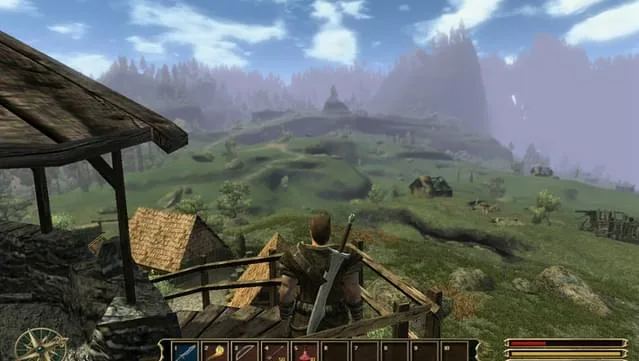
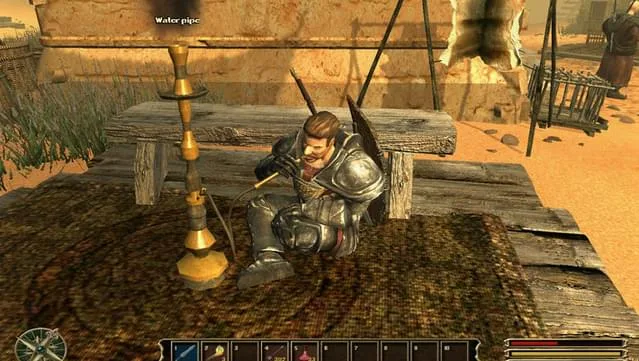
Final Verdict
Gothic 3 is not a polished modern RPG, and it does not pretend to be. What it offers is a sprawling, choice-driven world where your decisions actually matter, wrapped in a v2.01.08 build that fixes many of the launch problems. If you value freedom and exploration over slick interfaces, this is an easy recommendation. If you need a guided experience with a clean UI, you will likely find it frustrating. We tested it, and for the price of free, it is absolutely worth a download.
Gothic 3 Free Download (v2.01.08)
Download Gothic 3 (v2.01.08)
Size: 2.74 GB
Reminder: This download is completely free and won't cost you a penny. However, if you love the game and want to purchase it, you can support the developers by doing so here.
Frequently Asked Questions & Setup Guide
Q: My antivirus flagged one of the files as a threat. Is this game safe?
A: Yes, all files on our site are 100% verified clean. Antivirus software may occasionally flag steam_api.dll or crack files as false positives due to modified game binaries. Temporarily whitelist the game directory before extracting.
Q: I get a missing DLL error (e.g., VCRUNTIME140.dll, MSVCP140.dll, or D3DCOMPILER). How do I fix it?
A: Missing DLL errors indicate missing Windows system libraries. Ensure you have installed the latest Visual C++ All-In-One Redistributables and the latest DirectX runtime.
Q: Where are my game save files located?
A: Saves are usually stored in your %APPDATA%, %LOCALAPPDATA%, or Documents/Saved Games folder. Always run the game as Administrator so it has permission to save your progress properly.
Q: Can I play online or multiplayer with friends?
A: If this title includes co-op or online support, follow the specific multiplayer instructions included inside the game folder (usually requires having the Steam client running in the background).