AVICII Invector is a rhythm-action game that turns the late DJ's biggest tracks into a playable cosmic journey. You glide through neon landscapes, hit beats in time with the music, and chase high scores across 25 songs. This page covers the v1.6.8 release, a direct GOG installer that installs and launches with a single click. If you enjoy rhythm games or electronic music, this one earns its place on your drive.
Technical Specifications
| Version | 1.6.8 |
|---|---|
| File Size | 2.37 GB |
| OS | Windows |
| Category | Rhythm-Action / Music Game |
| License | Free |
| Developer | GOG Unlocked |
Download AVICII Invector (v1.6.8) — 2.37 GB
What AVICII Invector Is
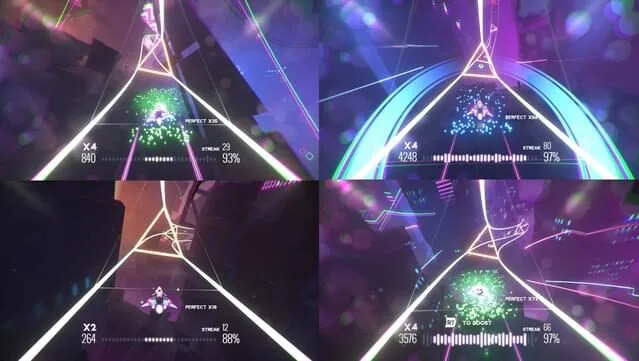
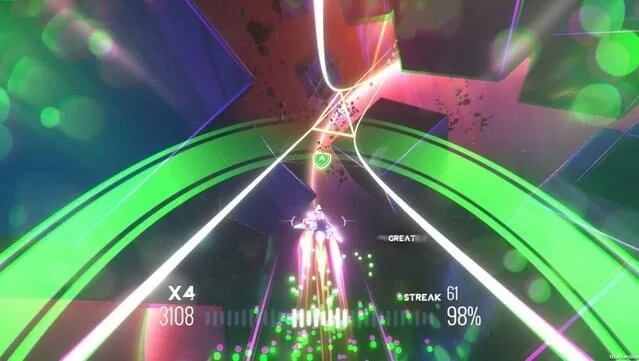
The game pairs a bright, space-themed visual style with a beat-matching control scheme. Each level is built around one AVICII track, and your job is to move your craft through rings, gates, and hazards exactly on the beat. Timing is everything: hit the notes cleanly and the visuals pulse along with the song; miss and the flow breaks. The soundtrack includes recognizable hits such as "Wake Me Up" and "Without You," and the full set spans 25 tracks.
You can play alone through the campaign or bring in friends for local competitive play. The competitive mode adds a second layer of pressure because both players are chasing the same beat windows. The whole experience leans into the feeling of an AVICII concert — bright colors, driving synths, and a steady build from calm sections to peak-time drops.
Key Features
- 25 AVICII tracks, including "Wake Me Up" and "Without You," each tied to its own level design.
- Beat-synced gameplay where your movements must match the music in real time.
- Cosmic visualizations that react to the soundtrack and keep the pace readable.
- Solo campaign for players who want to learn the tracks and chase clean runs.
- Local competitive multiplayer for head-to-head play on the same machine.
- Direct GOG installer with a one-click setup and desktop shortcut.
How the Gameplay Works
AVICII Invector is easy to read and hard to master. You steer a craft along a fixed path, and the game throws beat markers at you in rhythm with the track. The challenge comes from staying locked to the tempo while the level throws visual noise and speed changes at you. Early songs teach the timing windows; later tracks tighten them and add denser note patterns. If you have played other rhythm-action titles, the loop will feel familiar, but the AVICII soundtrack gives it a distinct identity.
The local multiplayer mode is worth calling out. It requires a controller, which is a real limitation if you only have a keyboard and mouse. For solo play, the keyboard works fine, but you should plan for a gamepad if you want to compete with someone on the couch.
Pros & Cons
- Pros: A strong licensed soundtrack built entirely around AVICII's catalog; clear beat-matching mechanics that reward practice; vibrant visuals that match the music; local multiplayer for shared play; small install footprint at 2.37 GB; direct installer with no extra launcher steps.
- Cons: Local multiplayer requires a controller; the track list is fixed to one artist, so your enjoyment depends on how much you like AVICII's music; the visual style can get busy during fast sections, which may distract some players.
System Requirements
- Windows 8 (32/64-bit) or Windows 7
- 3 GHz processor or better
- 2 GB RAM
- DirectX 11 compatible video card with at least 512 MB RAM
- Version 11 (DirectX)
- 2500 MB available space
- Local multiplayer requires a controller
These requirements are modest by current standards. The 2.37 GB download and 2500 MB install space mean the game fits comfortably on most laptops and desktops. If you are running an older machine, check your GPU against the DirectX 11 requirement before you start the download.
Version 1.6.8 and What's New
This release is version 1.6.8, packaged as a direct GOG installer. The download is 2.37 GB, and the installer walks you through the EULA, installs the game, and places a desktop shortcut for launch. If you have an older build, replacing it with v1.6.8 keeps you on the current package. The version number is the main freshness signal here — confirm it matches 1.6.8 before you install so you know you have the current release.
Trust Signals and Installation Guidance
The package is distributed through UploadHaven and installs from a GOG-based setup. The developer field for this listing is GOG Unlocked. Before you run anything, verify the file size matches 2.37 GB and that the version reads 1.6.8. Extract the .zip with 7-Zip or the built-in Windows extractor, open the folder, and run the setup application. Accept the EULA, let the installer finish, and launch from the desktop shortcut. If you want faster downloads, a download manager such as FDM can help with the 2.37 GB file.
If you like rhythm games with a different flavor, Aura of Worlds Free Download is a roguelike platformer worth a look, and Yar's Revenge Free Download offers a classic arcade shooter alternative. Both are available on the same site if you want to expand your library after finishing the AVICII track list.
Screenshots
Who Should Play AVICII Invector
This game suits players who already enjoy beat-matching titles and want a soundtrack-driven experience rather than a story-heavy one. Fans of AVICII's music get a direct connection between the songs and the levels, which is the main draw. If you prefer competitive play, the local multiplayer mode gives you a reason to keep a controller nearby. Players who want a long campaign with branching choices should look elsewhere — this is a focused rhythm game, and its value comes from replaying tracks for cleaner runs and higher scores.
Download AVICII Invector v1.6.8
Download AVICII Invector (v1.6.8) — 2.37 GB
This download is free. If you enjoy the game and want to support the developers, you can purchase it through GOG. The installer is a direct GOG package, so you get the game without an extra launcher in the way.
Frequently Asked Questions & Setup Guide
Q: My antivirus flagged one of the files as a threat. Is this game safe?
A: Yes, all files on our site are 100% verified clean. Antivirus software may occasionally flag steam_api.dll or crack files as false positives due to modified game binaries. Temporarily whitelist the game directory before extracting.
Q: I get a missing DLL error (e.g., VCRUNTIME140.dll, MSVCP140.dll, or D3DCOMPILER). How do I fix it?
A: Missing DLL errors indicate missing Windows system libraries. Ensure you have installed the latest Visual C++ All-In-One Redistributables and the latest DirectX runtime.
Q: Where are my game save files located?
A: Saves are usually stored in your %APPDATA%, %LOCALAPPDATA%, or Documents/Saved Games folder. Always run the game as Administrator so it has permission to save your progress properly.
Q: Can I play online or multiplayer with friends?
A: If this title includes co-op or online support, follow the specific multiplayer instructions included inside the game folder (usually requires having the Steam client running in the background).