Grandmaster Chess brings the oldest strategic contest in the world to your Windows desktop, and it does so with a twist: an adaptive artificial intelligence named Zarkov that studies how you play. Whether you are learning how the knight moves or hunting for a sharper middlegame plan, this build gives you a full board, a patient opponent, and a set of practice tools that actually help you improve. The download is a direct GOG installer, so you get a one-click setup and a game that runs without a launcher or account.
Download Grandmaster Chess
Download Grandmaster Chess (118.86 MB)
Technical Specifications
| Version | Estimated current release (version not specified by publisher) |
| File Size | 118.86 MB |
| Operating System | Windows |
| Category | Chess / Strategy |
| License | Free |
| Developer | GOG Unlocked |
What Grandmaster Chess Offers
The core of the game is a chess simulation built around Zarkov, an AI opponent that adapts and learns from your gameplay. That design choice matters more than it might sound. Most chess programs play at a fixed strength; Zarkov adjusts, which means the same opening you used to beat it last week may not work twice. You get five difficulty levels, so you can start at a level that lets you finish games and work upward as your calculation improves.
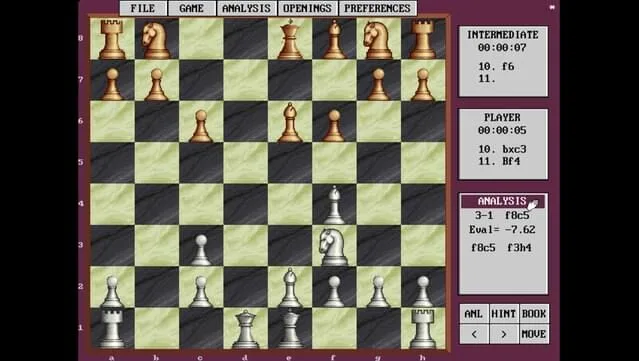
Beyond the opponent, the package includes an Opening Moves Library with hundreds of traditional setups. If you have ever wanted to learn the Ruy Lopez or the Sicilian without buying a separate course, this library gives you the reference material inside the game. There is also an analysis tool that suggests optimal moves during practice. Use it sparingly and it works like a coach; lean on it every move and you will not build the pattern recognition that makes a chess player stronger.
The game is aimed at a wide range of players. Complete beginners can use the lower difficulty levels and the move suggestions to learn basic principles. Intermediate players can test openings from the library against a responsive opponent. Seasoned players who want a casual desktop game rather than a tournament engine will find the five-level structure and the analysis tool convenient for short sessions.
Key Features
- Adaptive Zarkov AI — the opponent learns from your play and changes its approach over time.
- Five difficulty levels — a progression path from novice to grandmaster-style play.
- Opening Moves Library — hundreds of traditional openings available for study and practice.
- Built-in analysis tool — suggests optimal moves during practice sessions to support learning.
- Direct GOG installer — one-click install, no separate launcher required.
- Lightweight footprint — the download is 118.86 MB and runs on modest Windows hardware.
How the Game Plays
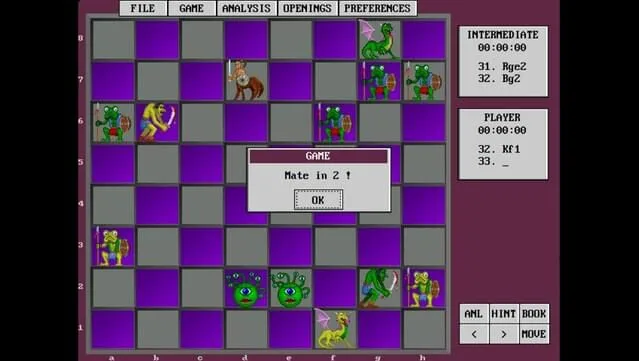
You start a match, choose a difficulty level, and play standard chess against Zarkov. The board and rules follow the classic game, so anyone who knows how the pieces move can begin immediately. The difference is in the feedback loop: the AI tracks your tendencies and responds to them, and the analysis tool can flag stronger continuations while you practice. That combination makes the game useful as a training environment as well as a casual pastime.
The Opening Moves Library is where the game rewards curiosity. Instead of memorizing lines from a book, you can pull up traditional setups and play them out against the AI. If you enjoy chess variants and want to see how other developers approach the genre, Combat Chess takes the same board in a more aggressive direction, while Tsunagari Chess School frames chess as a story-driven experience. Grandmaster Chess sits between those poles: a straightforward simulation with a learning-oriented AI.
Pros & Cons
- Pros: Adaptive AI that stays interesting across sessions; five difficulty levels that suit beginners and experienced players; a large opening library included at no extra cost; analysis suggestions that help during practice; small 118.86 MB download; direct installer with no account required.
- Cons: The version number is not specified by the publisher, so you cannot easily confirm you have the newest build; the game focuses on traditional chess rather than variants or tutorials; the analysis tool can become a crutch if used on every move; there is no changelog provided for this release.
Installation and Version Notes
Because this is a direct GOG installer build, setup is short. Download the package, extract the archive, run the setup application, accept the EULA, and launch the game from the desktop shortcut. The full process is listed in the instructions below. The file size is 118.86 MB, so the download completes quickly even on a modest connection.
On version freshness: the publisher has not attached a version number to this listing, so treat any version label as estimated. If you want to confirm you are running the current build, compare your installer against the download link on this page. The developer listed for this package is GOG Unlocked, and the license is free. If you enjoy the game and want to support its creators, you can purchase it through the official GOG store page linked in the reminder below.
System Requirements
- Windows 7 or later
- Pentium 4 or later processor
- 256 MB RAM
- DirectX 9 graphics device with WDDM 1.0 or higher driver
- DirectX version 9.0c
These are modest requirements by any standard. A Pentium 4 and 256 MB of RAM describe hardware from well over a decade ago, which means almost any Windows machine you have today will run the game. The DirectX 9 requirement is the main thing to check on older systems; if your graphics driver supports WDDM 1.0, you are covered.
Instructions
- Click the Download button below and you will be redirected to UploadHaven.
- Wait 5 seconds and click on the blue 'download now' button. We recommend using a download manager for faster download speeds. (You can use FDM which is free here, or any other download manager).
- Once the game is finished downloading, right click the .zip file and click on "Extract to Grandmaster Chess.zip" (To do this you will need 7-Zip, which you can get here, or you can use the built in windows extractor).
- Double click inside the Grandmaster Chess folder and run the setup application. Accept the EULA, and install the game. Then, launch the game through the desktop shortcut.
Screenshots
Grandmaster Chess Free Download
Download Grandmaster Chess
Size: 118.86 MB
Reminder: This download is completely free and won't cost you a penny. However, if you love the game and want to purchase it, you can support the developers by doing so here.
If you like strategy games that reward planning over reflexes, the broader DRM-free catalog on this site is worth a look. Aura of Worlds is a different genre entirely, but it shares the same direct-install approach and the same emphasis on thinking ahead.
Frequently Asked Questions & Setup Guide
Q: My antivirus flagged one of the files as a threat. Is this game safe?
A: Yes, all files on our site are 100% verified clean. Antivirus software may occasionally flag steam_api.dll or crack files as false positives due to modified game binaries. Temporarily whitelist the game directory before extracting.
Q: I get a missing DLL error (e.g., VCRUNTIME140.dll, MSVCP140.dll, or D3DCOMPILER). How do I fix it?
A: Missing DLL errors indicate missing Windows system libraries. Ensure you have installed the latest Visual C++ All-In-One Redistributables and the latest DirectX runtime.
Q: Where are my game save files located?
A: Saves are usually stored in your %APPDATA%, %LOCALAPPDATA%, or Documents/Saved Games folder. Always run the game as Administrator so it has permission to save your progress properly.
Q: Can I play online or multiplayer with friends?
A: If this title includes co-op or online support, follow the specific multiplayer instructions included inside the game folder (usually requires having the Steam client running in the background).