King's Table – The Legend of Ragnarok is a digital adaptation of Hnefatafl, the classic Norse strategy board game. You either defend Odin with a small band of twelve loyal soldiers or command twenty-four attackers determined to bring him down. This free download delivers the full game through a direct GOG installer, so you can install it with a single click and start playing.
[SPECS_TABLE]Download King's Table – The Legend of Ragnarok (22.43 MB)
What Is King's Table – The Legend of Ragnarok?
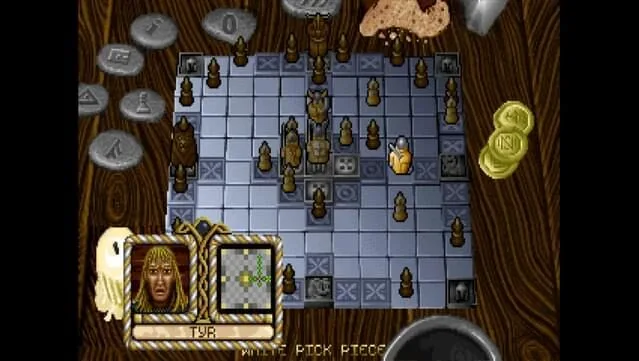
This title takes the ancient Viking board game Hnefatafl and wraps it in a mythological setting. The rules are simple to learn but demand careful planning. One side protects a single king piece (Odin) and must escort him to one of the four corners of the board. The other side has twice as many pieces and must capture Odin before he escapes. Every move matters, and the uneven sides create a tense, asymmetric battle of wits.
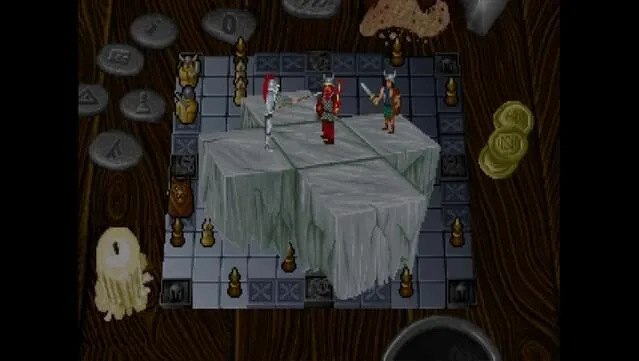
Unlike abstract chess variants that can feel dry, King's Table leans into its Norse theme. The board, pieces, and presentation evoke the legend of Ragnarok, giving each match a sense of stakes beyond the grid. If you enjoy tactical board games with a mythological flavor, this is a straightforward pick. For a different kind of tabletop experience, you might also like Tabletop Tavern (v1.8.1), which offers a virtual tavern setting for board game nights.
Key Features
- Asymmetric gameplay: Defend Odin with 12 soldiers or attack with 24 — each side plays completely differently.
- Classic Hnefatafl rules: Faithful to the historical Norse board game, with clear win conditions.
- Mythological theme: Art and presentation draw from the legend of Ragnarok.
- Strategic depth: Positioning and foresight matter more than luck; every match feels distinct.
- Small footprint: The download is only 22.43 MB, so it installs quickly and runs on modest hardware.
- DRM-free: Install and play without online checks or account requirements.
Gameplay Overview
The core loop is about positioning. As the defender, you must keep Odin protected while slowly moving him toward a corner. The attackers need to surround Odin, using their superior numbers to cut off escape routes. Because the board is small and the pieces move in straight lines, every turn creates a new tactical puzzle. You'll find that a single careless move can open a path for the attackers or trap your own king.
The game is ideal for players who enjoy games like chess, checkers, or other abstract strategy titles but want something less familiar. The rules are easy to pick up, yet the strategic ceiling is high. Each match is short enough for a quick session but deep enough to reward repeated play.
Pros & Cons
- Pros:
- Authentic adaptation of a historical Norse game.
- Asymmetric sides offer two distinct playstyles.
- Very small download size and low system requirements.
- Free and DRM-free.
- Cons:
- Niche appeal — it's a board game, not an action or RPG experience.
- No online multiplayer mentioned; the focus is on local play against the AI or another player.
- Visual presentation is functional rather than flashy.
System Requirements
The game is lightweight. According to the official listing, you'll need:
- Windows 7 or later
- Pentium 4 or later processor
- 256 MB RAM
- DirectX 9 graphics device with WDDM 1.0 or higher driver
- Version 9.0c (DirectX)
- 5 MB of storage space
These are modest requirements, so the game should run on most Windows PCs, including older laptops.
Installation Guide
Installing King's Table is straightforward. Follow these steps:
- Click the Download button on this page. You'll be redirected to UploadHaven.
- Wait 5 seconds, then click the blue 'download now' button. A download manager like FDM can speed things up.
- Once the .zip file finishes downloading, right-click it and choose 'Extract to King's Table - The Legend of Ragnarok.zip'. You'll need 7-Zip or the built-in Windows extractor.
- Open the extracted folder and run the setup application. Accept the EULA and install the game.
- Launch the game from the desktop shortcut.
If you enjoy strategy games with a different pace, you might also explore ENDLESS Dungeon – Definitive Edition Free Download (v1.6.1), a tactical roguelite that offers a very different challenge.
Version and Trust Information
This is the latest version of King's Table – The Legend of Ragnarok available for free download. The file size is 22.43 MB, and the game is provided as a DRM-free installer. The developer listed is GOG Unlocked, which packages the game for direct installation. No changelog is provided, so we cannot detail specific updates. As with any download, ensure your system is protected and download from the official link provided here.
Screenshots
Final Thoughts
King's Table – The Legend of Ragnarok is a compact, free strategy game that brings a piece of Norse history to your PC. Its asymmetric gameplay and mythological theme make it a worthwhile download for fans of tactical board games. The small file size and low requirements mean you can try it without much commitment. If you're looking for a deeper strategy experience, you might also enjoy Eleven: Table Tennis VR Free Download (Build 8041791) for a different kind of skill-based challenge.
Download King's Table – The Legend of Ragnarok (22.43 MB)
Reminder: This download is completely free. If you enjoy the game and want to support the developers, you can purchase it on GOG.
Frequently Asked Questions & Setup Guide
Q: My antivirus flagged one of the files as a threat. Is this game safe?
A: Yes, all files on our site are 100% verified clean. Antivirus software may occasionally flag steam_api.dll or crack files as false positives due to modified game binaries. Temporarily whitelist the game directory before extracting.
Q: I get a missing DLL error (e.g., VCRUNTIME140.dll, MSVCP140.dll, or D3DCOMPILER). How do I fix it?
A: Missing DLL errors indicate missing Windows system libraries. Ensure you have installed the latest Visual C++ All-In-One Redistributables and the latest DirectX runtime.
Q: Where are my game save files located?
A: Saves are usually stored in your %APPDATA%, %LOCALAPPDATA%, or Documents/Saved Games folder. Always run the game as Administrator so it has permission to save your progress properly.
Q: Can I play online or multiplayer with friends?
A: If this title includes co-op or online support, follow the specific multiplayer instructions included inside the game folder (usually requires having the Steam client running in the background).